
Asianet DataLine Auto Login for Windows
 Asianet Dataline is one of the top broadband service providers in my state (Kerala). Asianet Dataline (ADL) provides excellent bandwidth when it comes to pre-paid plans with fixed download limits. Every time you connect to the broadband network, ADL requires you to login using a browser. You also need to keep this browser session open. Otherwise ADL automatically disconnects you from the broadband network.
Obviously this is a big hassle. Many times I have accidently closed the browser and right in the middle of a big download, my connection gets terminated. Also most of the time I want the Internet connectivity as soon as I login to my system.
This is where ADL Auto Login comes to the rescue. ADL Auto Login eliminates the need for an open browser session to keep you connected to Asianet broadband. It can be configured to run as soon as you login to Windows. You can also save your login credentials and ADL Auto Login will automatically authenticate you with Asianet servers.
Using ADL Auto Login you can login or logout from Asianet broadband servers at any time. It also displays the connection status in Windows system tray.
Download ADL Auto Login for Windows
Download ADL Auto Login for Windows 1.0
Installing ADL Auto Login for Windows
Download ADL Auto Login zip from the above link and extract the executable to a folder of your choice. Please note that the file Interop.IWshRuntimeLibrary.dll must be present in the same directory as the executable.
Run the program and configure your settings. Select "Start program with windows login" and "Automatically login on program run". On your next Windows login, you will be automatically logged in to the Asianet broadband.
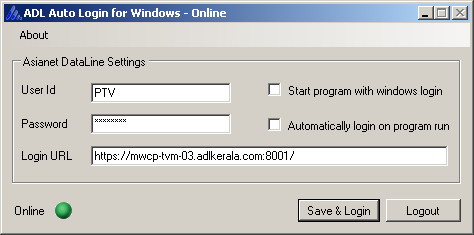
Please note that the login url given above is only an example. You need to get your login url from the browser by trying to connect to an external Web site.
ADL Auto Login is tested on Windows XP, Windows Vista and Windows 7 and requires .NET framework 2.0 or above.
Feedback & Updates
If you have any comments or suggestions about this program please let me know. Watch this page or my twitter feed for any updates.
Software Disclaimer
This software is provided "as is" and any express or implied warranties, including, but not limited to, the implied warranties of merchantability and fitness for a particular purpose are disclaimed. In no event shall the copyright owner be liable for any direct, indirect, incidental, special, exemplary, or consequential damages however caused.

dude you are awesome thanks for this cool software...the most weird thing in now-a-days my pc is automatically starting after a power shortage and i want an auto login software to login to the adl account to autostart the torrents....now i'm happy thanks a lot man
ReplyDeleteHello slimshady6291.Use wakeuponstandby.Is is a useful software.It helps you to set tasks.So if you set this adl login app at the given time the computer will turn off and do the given taks.
DeleteThis comment has been removed by the author.
ReplyDelete